 羞羞的铁狼
羞羞的铁狼qBittorrent 是一款轻量高速的免费 BT 下载客户端软件,似乎一心想要取代 uTorrent 成为人们首选的 BT 下载软件。它跨平台支持 Windows、Mac 以及 Linux、BSD!它就像是开源界的 uTorrent 重制版,同样的小巧精悍,而且在功能和界面上都非常相似,甚至连未下载完的文件都可以由 uTorrent 接手继续下载。
qBittorrent 可以通过 BT 种子 .torrent 以及 Magnet 磁力链接下载;支持包括 DHT、Peer Exchange、Full encryption 等多种下载技术,支持下载完成后自动关机、限制上传下载速度、并可支持 iPv6、支持下载排程、IP 过滤、RSS 订阅以及多个国外论坛的种子搜索、分类浏览等功能一应俱全。
另外qBittorrent 内建支持简体中文语言,并且还提供了相当方便的「远程控制功能」,可以让你出门在外时也能控制远程的电脑进行下载。这个远程功能不仅提供了 Web UI (网页版界面) 供你访问,你也可以使用第三方的远程控制 APP,如 Android 上的 qBittorrent Controller 等手机/平板应用也可以进行远程控制。首次使用 qBittorrent 你会感觉非常亲切,就像最初的 uTorrent 那样,轻巧、简洁、高速!而且 qBittorrent 支持 Windows、Mac 和 Linux 系统也能让你在不同平台上都能轻松高速下载 BT资源。可以说,qBittorrent 继承了 uTorrent 几乎全部的优点。
软件官网: https://www.qbittorrent.org/
安装qBittorrent
首先安装EPEL源
sudo yum -y install epel-release && sudo yum -y updateEPEL 有两种版本,一个是qbittorrent,它需要有X Server;另一个qbittorrent-nox 则不用。一般选qbittorrent-nox就好。
使用命令
sudo yum -y install qbittorrent-nox安装完毕
建立系统服务
新增qBittorrent 的用户。
sudo useradd qbtuser创建systemd 的服务
sudo vi /usr/lib/systemd/system/qbittorrent.service输入下列内容,如果不想新增使用者,也可以把qbtuser 换成其他的使用者帐号,但是不能用nobody 帐号,也千万别用root 帐号!!!
\[Unit\]
Description=qBittorrent Daemon Service
After=network.target

\[Service\]
User=qbtuser
ExecStart=/usr/bin/qbittorrent-nox
ExecStop=/usr/bin/killall -w qbittorrent-nox

\[Install\]
WantedBy=multi-user.target
保存后,重新启动systemd 服务。
sudo systemctl daemon-reload然后手动执行一次qBittorrent,
sudo qbittorrent-nox按「Y」接受它的免责声明,再按「Ctrl + C」停止。
\*\*\* Legal Notice ***
qBittorrent is a file sharing program. When you run a torrent, its data will be made available to others by means of upload. Any content you share is your sole responsibility.

No further notices will be issued.

Press 'y' key to accept and continue...
然后你会看到如下信息:
\*\*\*\*\*\*\*\* Information ********
To control qBittorrent, access the Web UI at http://localhost:8080
The Web UI administrator user name is: admin
The Web UI administrator password is still the default one: adminadmin
This is a security risk, please consider changing your password from program preferences.
03/02/2016 15:51:03 - The Web UI is listening on port 8080
03/02/2016 15:51:04 - qBittorrent is successfully listening on ...
这边可以看到预设的Web 管理界面的信息:
- 地址:http://localhost:8080
- 帐号:admin
- 密码:adminadmin
然后设置让它开机自动启动
sudo systemctl enable qbittorrent系统设定
从浏览器打开Web UI,比如安装qBittorrent的地址如下: http:// 10.1.1.215 :8080 
这就是qBittorrent 的Web UI。
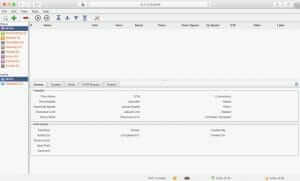
要更换语言,只要到「Tools」的「Options」选单里,选择「WebUI」页签,把「User Interface Language」改成「简体中文」。然后把页面拉到最下方,按「Save」储存设定值,重新启动qBittorrent。
sudo systemctl restart qbittorrent
重新登陆就可以切换成中文界面了。
关于系统的其他设定,这个与其他BT客户端类似,另外别忘了在防火墙上打开相应的连接端口,然后慢慢享用吧!